My Role
Designed and built the workflow in n8n.



Every feature I designed with a banner or card image started the same way. I searched a huge image library, picked a few images, and tried them in the design. When they didn’t fit, I went back and searched again. Getting to three options took about a week, and that was before I showed them to the team. Their feedback was usually about whether the images fit.
So I built an image agent in Slack, using n8n and Copilot. You describe the image you need. The agent searches the library first and reuses an image when one fits. If nothing fits, it creates a new one in the same look. If it can’t tell whether an image will work, it asks in the thread before going further.
Today
Harish Bhetalam
Find me an image of a truck on the highway to use as the banner for the Truck Warranty landing page and the homepage. The image should show the truck’s components, like the engine and drivetrain, so it’s clear the warranties customers can shop cover those parts. Landscape, wide enough for a full-width banner.
Image agentAPP
Here’s an image from the library. The cutaway shows the engine and drivetrain, so the warranty coverage reads at a glance. Let me know if you need any changes to it, or a different image.
Found in SharePoint / DTNA Aftermarket / Trucks / 2020FreightlinerCalendar_Detroit_b_12x18_Horizontal.jpg
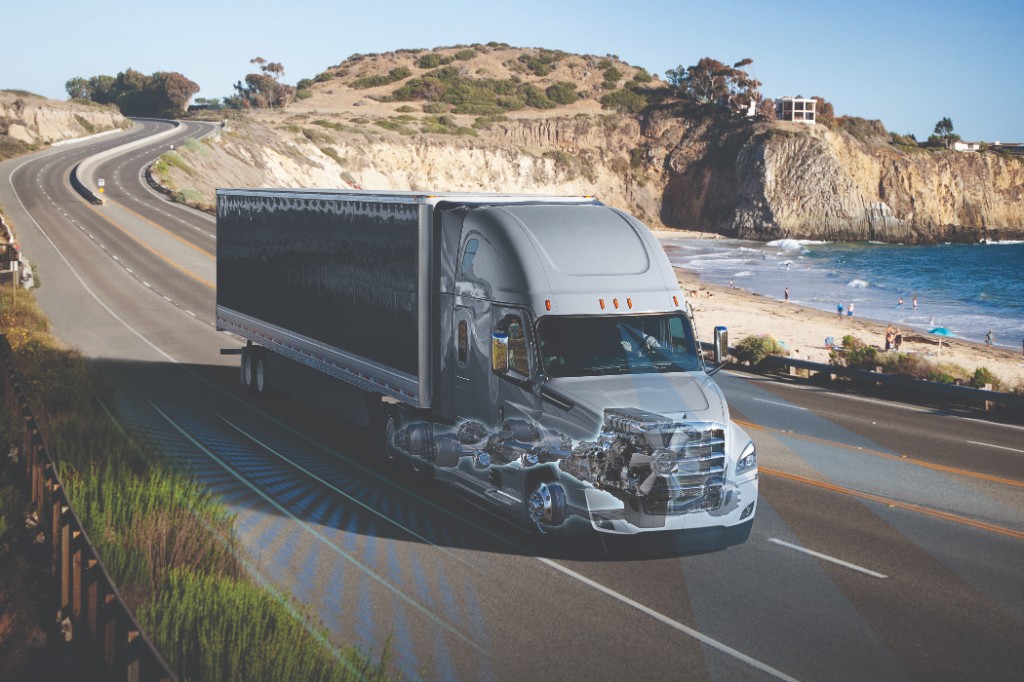
Image agent is typing
Message #image-agent
Before A week Getting to three options took about a week, and the team hadn’t seen them yet.
Now One message The image comes back in the thread, faster when the request names a folder or the parts.
You ask in Slack. Copilot reads the request, and the agent searches the library in SharePoint. If nothing fits, Copilot creates a new image. The image posts back in the same thread.
I showed it at one of our team huddles. People saw the value right away and asked for access, so I opened it to my team. They shared it with the teams they work with, and it spread from there into other teams’ daily work.
I first wrote the instructions for my own feature work. Once other teams started using it, I rewrote them so they work for any team’s request.
Naming one of these folders in a request makes the search faster.
on-highway, cascadia, new-cascadia, classic-cascadia, m2, western-star, ecascadia, in-yard
powertrain, engines, detroit, dd13, dd15, series-60, dt12, axles, drivetrain, aftertreatment
parts, brakes, brake-kit, filters, suspension, steering, electrical, hvac, cab, wheel-end
campaigns, warranty, aftermarket-brakes, genuine-parts, reman, all-makes
showroom, dealer, parts-counter, fleet, handover
service-bay, training, inspection, diagnostics, overhaul
templates, layouts, headlines, logos, icons